Same chat, every screen
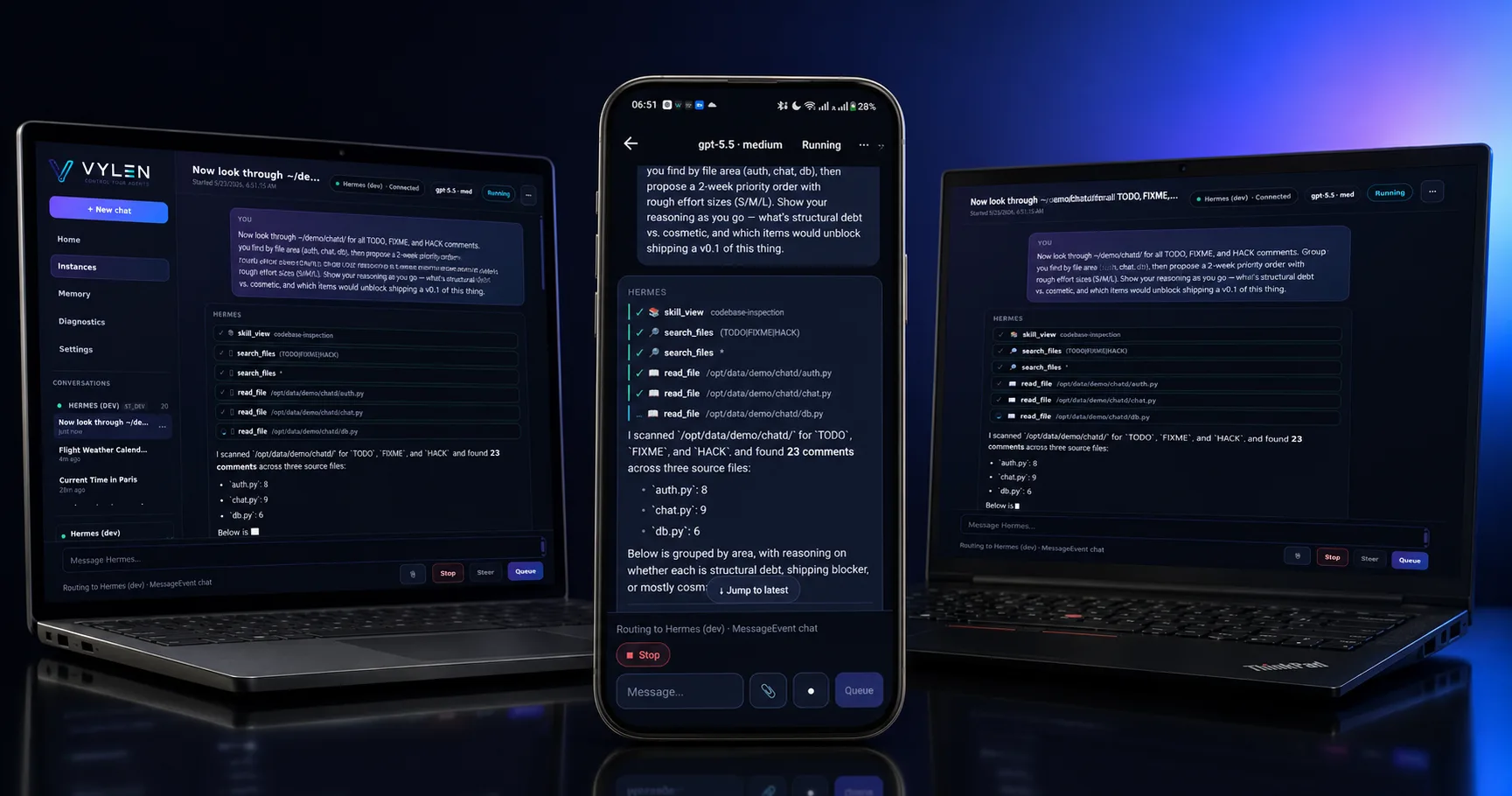
Earlier this week I had the same conversation open on three screens at once. Linux Chrome at my desk. Windows Chrome on a second machine. The Vylen iOS app on my iPhone, propped against my keyboard. I typed a question on the desktop and pressed enter.
The agent’s response started streaming. Token by token. On all three screens. At the same time.
I have used multi-device messaging since iMessage was new. I had never seen an AI agent fan out like that. The model was still in the middle of its sentence on my laptop, and my phone was rendering the same sentence in lockstep, with its own cursor, its own scroll position, its own keyboard ready to type the next message.
This is what we built when we moved Vylen’s chat state out of the cloud and onto the Hermes plugin.
What just happened
Most products that talk about “real-time sync” mean messages get delivered to your other devices eventually. Slack works that way. iMessage works that way. The message arrives somewhere first; later, it shows up everywhere else.
What Vylen does is different. There is exactly one Hermes runtime — yours, on your hardware — and it is doing the streaming. Three clients are simultaneously tailing the same event stream off the same gateway plugin. The assistant’s tokens aren’t “delivered later” to the other devices. They are the same tokens, leaving the model once, fanned out to whoever is connected.
It feels like watching a TV with three remotes. Or, more accurately: like three windows into the same memory. If I scroll on my desktop, the phone doesn’t follow — each surface keeps its own state — but the agent itself is one stream, and every window sees it live.
Why most products don’t do this
There is a reason your average AI chat app doesn’t behave like this.
If you put chat state in the cloud, the vendor needs to broker every byte. Your transcripts, your prompts, your assistant outputs all sit on their servers. To make multi-device sync work, they have to take ownership of the conversation. That’s a lock-in story dressed up as a feature.
If you put chat state in the browser, you get privacy back but lose cross-device. Open the same product on a different machine and it has no idea what you’ve been talking about.
There’s a third option that nobody really takes because it’s the hardest: put chat state on the user’s own machine, but on a process that’s reachable from every device. That’s where Vylen lives. The Hermes gateway plugin runs next to the agent, and it’s the single thing every Vylen client — phone, tablet, laptop — already talks to.
Where the conversation actually lives
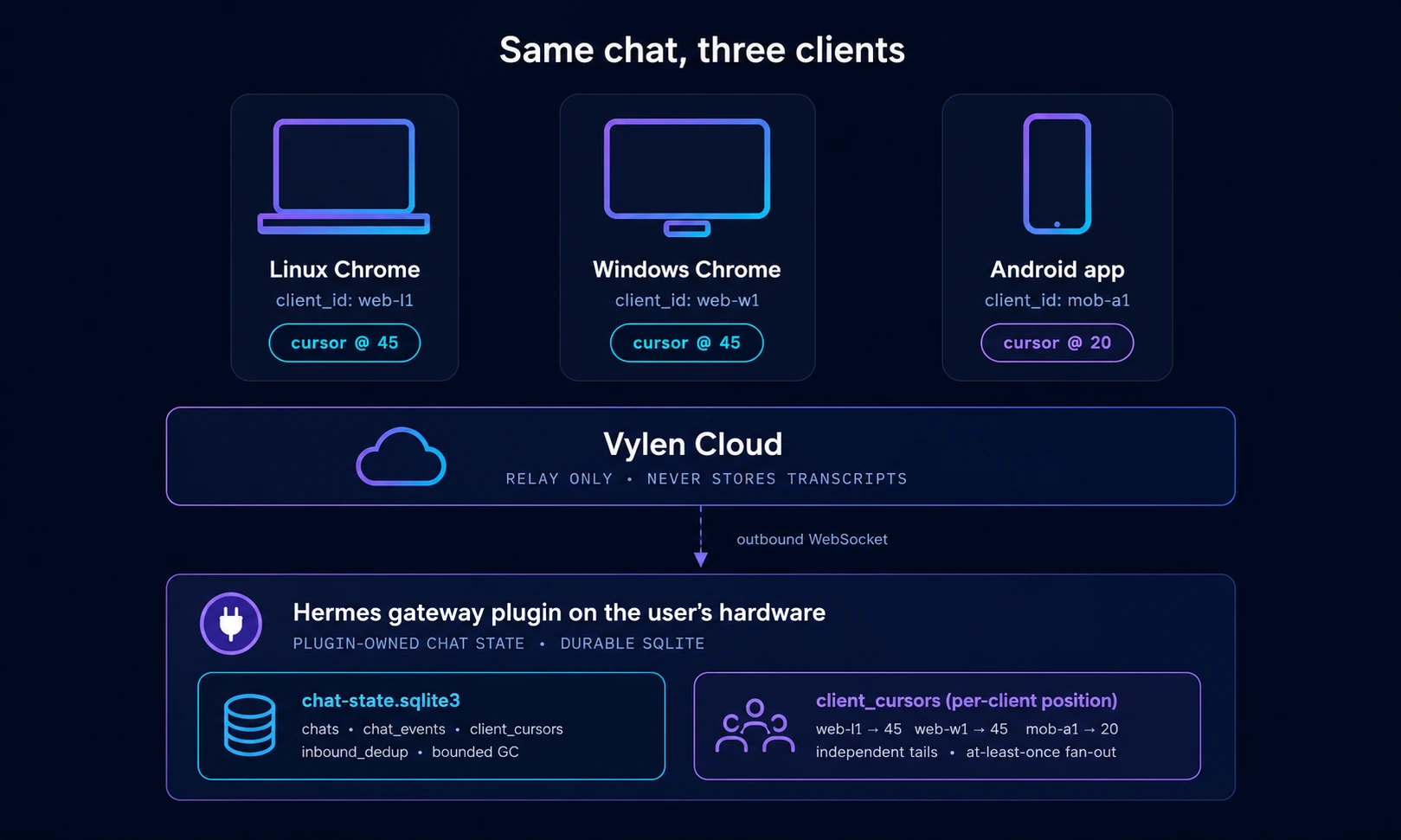
The conversation lives in a small SQLite database, on your hardware, inside the Hermes gateway plugin. We call this plugin-owned chat state. The right source of truth for a private agent is the user’s local Hermes gateway plugin — not the cloud. Cloud is a relay and an authorization layer. It routes frames. It does not store transcripts.
This is also why this design is possible. The plugin already had to be the place every device reached for one Hermes instance — it owns the agent connection. Once it’s also the place that owns the durable chat log, multi-client live tailing becomes a property of the system, not a feature you add.
The implementation is intentionally boring: Python’s standard sqlite3 module, a handful of tables (chats, chat_events, client_cursors, inbound_dedup), a bounded growth policy. No new runtime dependency. No new service.
Each client has its own cursor
When a Vylen client connects, it subscribes to a chat with three things: the chat_id, its own client_id, and the last sequence number it has seen. The plugin replays any events newer than that cursor, then keeps live-tailing.
The interesting bit is per-client. If my laptop is at sequence 20 and my phone is at sequence 18, the plugin doesn’t have a single shared queue that one client drains and the others lose. It has a cursor per (chat_id, client_id) pair, and a single event log. New events are appended once and replayed independently for each subscriber. One client at sequence 20 and another at sequence 18 both receive sequence 25 — without consuming each other’s buffers.
This is also why disconnect doesn’t lose anything currently inside retention. The events are durable. The cursor is just where you are in the log.
Phone sleeps, then catches up
Here’s the scenario that finally sold me on this.
My phone is at sequence 20. I lock the screen, go for a walk. My laptop continues the chat and reaches sequence 45 while I’m out. I come back, open the Android app — and instead of “nothing happened,” the phone reconnects with after_seq=20, the plugin replays sequence 21 through 45 from SQLite, then live-tails new events. It catches up to exactly where the desktop is, in roughly the time it takes to draw the chat view.
There’s an honest edge case worth naming. The plugin’s SQLite store is bounded — it doesn’t keep events forever. If GC has advanced the retention floor past your phone’s cursor while it was asleep, the phone gets back a clear “your cursor expired” signal, falls back to fetching a snapshot, and renders an inline gap marker in the transcript so you can see where older local events were garbage-collected. No silent data loss. No confused UI.
For the kind of chat I actually have (minutes, not weeks), the gap marker is something I might never see. But it’s the right behavior when retention runs out.
Why this matters
I want my agent to behave like ambient infrastructure, not like a session I have to babysit.
Start something on the laptop, glance at progress on the phone, finish it on the tablet, all without thinking about which surface “owns” the conversation. That used to be the cloud’s pitch — “your work, everywhere.” It came with the price of letting someone else hold the transcript. Plugin-owned chat state gives me the same coherence, on hardware I control.
The Hermes-side half of this is open source — hermes-vylen-gateway, MIT. If you want to see the SQLite schema, the cursor logic, and how multi-client fan-out actually shakes out in code, it’s all there.
If you self-host Hermes and you’ve been quietly putting up with a single-device agent, this is the part of Vylen I’d want you to try first. Same chat, every screen. Boringly consistent.
Related: Hermes Agent (GitHub): Self-Host Guide, Setup & Daily-Use Notes — the broader guide to running Hermes Agent locally and pairing it with Vylen. The approval-gate finding is the other field note from running this in production.